
Can I Run It — Hardware Compatibility & Performance Estimator
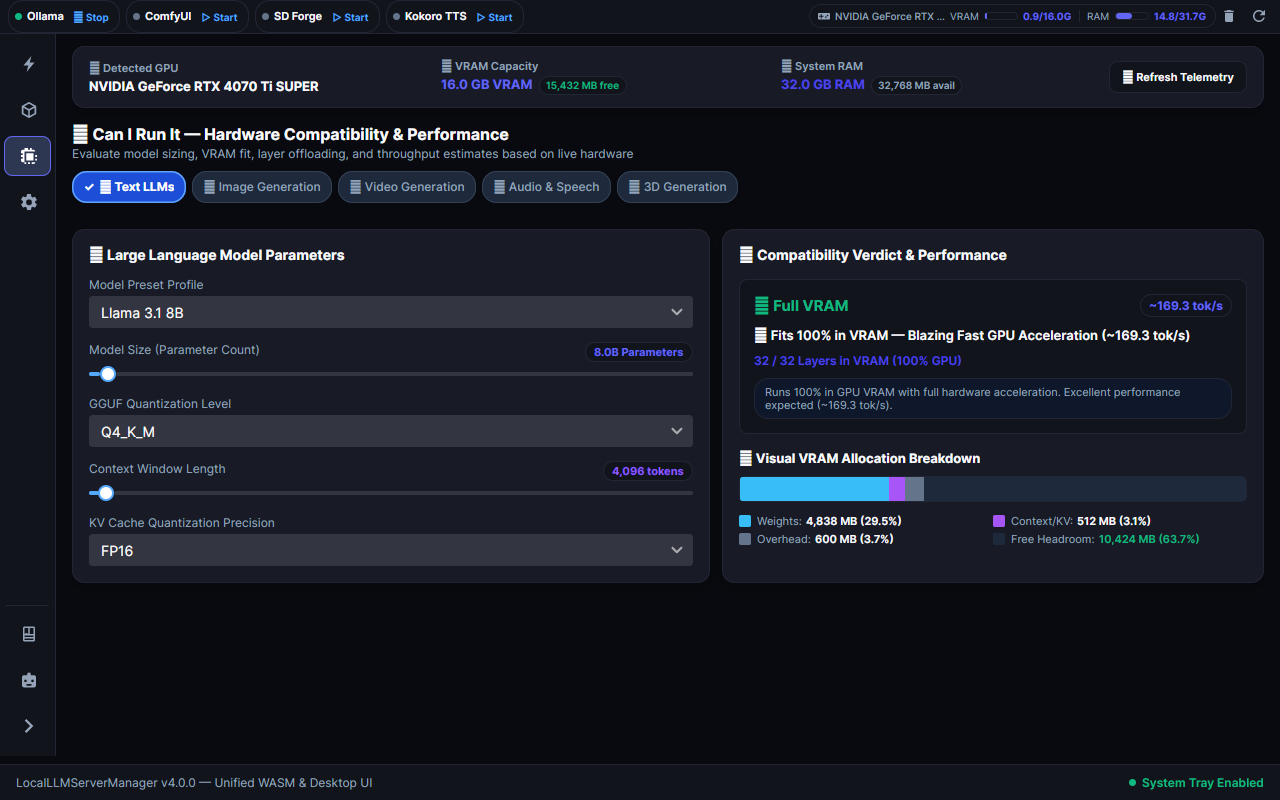
The Can I Run It workspace calculates whether an AI model can execute on your local hardware. It displays memory allocation, layer distribution, and throughput estimates before you download model weights.
1. Overview and Core Purpose
Large language models and diffusion networks require significant hardware resources. The Can I Run It tool prevents system out-of-memory errors. It checks your hardware specifications against model requirements in real time.
2. Hardware Telemetry Card
The top panel displays your current system specifications:
| Metric | Source | Function |
|---|---|---|
| Detected GPU | NVML / CUDA driver | Identifies the primary graphics accelerator. |
| VRAM Capacity | Live GPU memory query | Shows dedicated video memory and free space. |
| System RAM | Operating system query | Shows host system memory for CPU offloading. |
| Refresh Telemetry | User action button | Queries hardware status to capture memory changes. |
3. Supported Modalities
Select a modality tab at the top of the estimator:
- Text LLMs: Estimates GGUF models for Ollama and llama.cpp runtimes.
- Image Generation: Estimates FLUX.1, SDXL, and SD 1.5 diffusion models.
- Video Generation: Estimates Wan 2.2, LTX-Video 2.5, and HunyuanVideo DiT architectures.
- Audio & Speech: Estimates Kokoro TTS and music generation models.
- 3D Generation: Estimates TRELLIS and Hunyuan3D mesh reconstruction pipelines.
4. Parameter Configuration
Adjust the input sliders to model your target workload:
Model Preset Profile
Select a standard model profile from the dropdown menu (e.g., Llama 3.1 8B, Qwen 2.5 32B, DeepSeek R1 70B). The tool populates default parameters automatically.
Model Size (Parameter Count)
Use the slider to adjust the parameter scale from 0.5 billion to 70 billion parameters.
Quantization Level
Select the compression precision:
- FP16: Full 16-bit floating point precision (no quality loss, highest VRAM).
- Q8_0: 8-bit quantization (near-lossless, moderate VRAM savings).
- Q4_K_M: 4-bit medium quantization (industry standard, 50% VRAM reduction).
- Q2_K: 2-bit aggressive quantization (lowest VRAM, lower output quality).
Context Window Length
Set the token context buffer between 2,048 and 131,072 tokens. Longer context lengths increase memory consumption.
KV Cache Quantization Precision
Select the precision of the Key-Value attention cache (FP16, Q8_0, or Q4_0). Setting KV cache quantization to Q4_0 reduces cache memory usage by up to 70%.
5. Compatibility Verdict and Performance
The right panel shows the execution verdict and predicted speed:
Verdict Categories
| Badge | Status | Behavior | Performance Impact |
|---|---|---|---|
| Full VRAM | 🟢 Fits 100% in VRAM | All model layers execute on the GPU. | Maximum inference speed (e.g., ~169 tok/s). |
| Partial Offload | 🟡 GPU + CPU RAM | Critical layers run on GPU; remainder runs in RAM. | Moderate speed reduction due to PCIe transfer overhead. |
| CPU Only | 🟠 System RAM Only | Model exceeds total VRAM capacity. | Low throughput (1 to 5 tok/s). |
| Won't Fit | 🔴 Out of Memory | Model exceeds combined VRAM and system RAM. | Execution blocked to prevent application crash. |
6. Visual Memory Allocation Bar
The visual breakdown bar displays four color-coded memory segments:
[ ■ Weights (29.5%) | ■ Context/KV (3.1%) | ■ Overhead (3.7%) | ■ Free Headroom (63.7%) ]- Model Weights (Cyan): Static memory required to store loaded model tensors.
- Context / KV Cache (Purple): Dynamic memory allocated for conversation tokens.
- Runtime Overhead (Grey): CUDA runtime buffers and frame memory.
- Free Headroom (Dark Blue): Remaining unused video memory on the GPU.
7. Ambient Compatibility Badges Across the App
The sizing engine powers ambient compatibility badges throughout the application:
- Hugging Face Hub: Each search result card displays a live fit badge.
- CivitAI Hub: Checkpoint and LoRA cards display GPU compatibility status.
- Ollama Local Library: Installed models display instantaneous VRAM fit calculations.
- Diagnostic Test Flight: Pre-flight verification blocks runs when VRAM headroom is insufficient.