🚀 Model Context Gateway (MCG) Features Guide
This guide details the features of the Model Context Gateway (MCG).
🖥️ 1. Dynamic Server Management
Model Context Gateway (MCG) supports four methods to manage backend Model Context Protocol (MCP) servers:
Method A: Web UI Dashboard (Recommended)
Manage servers dynamically without restarting the gateway:
1. Open the router dashboard in a browser.
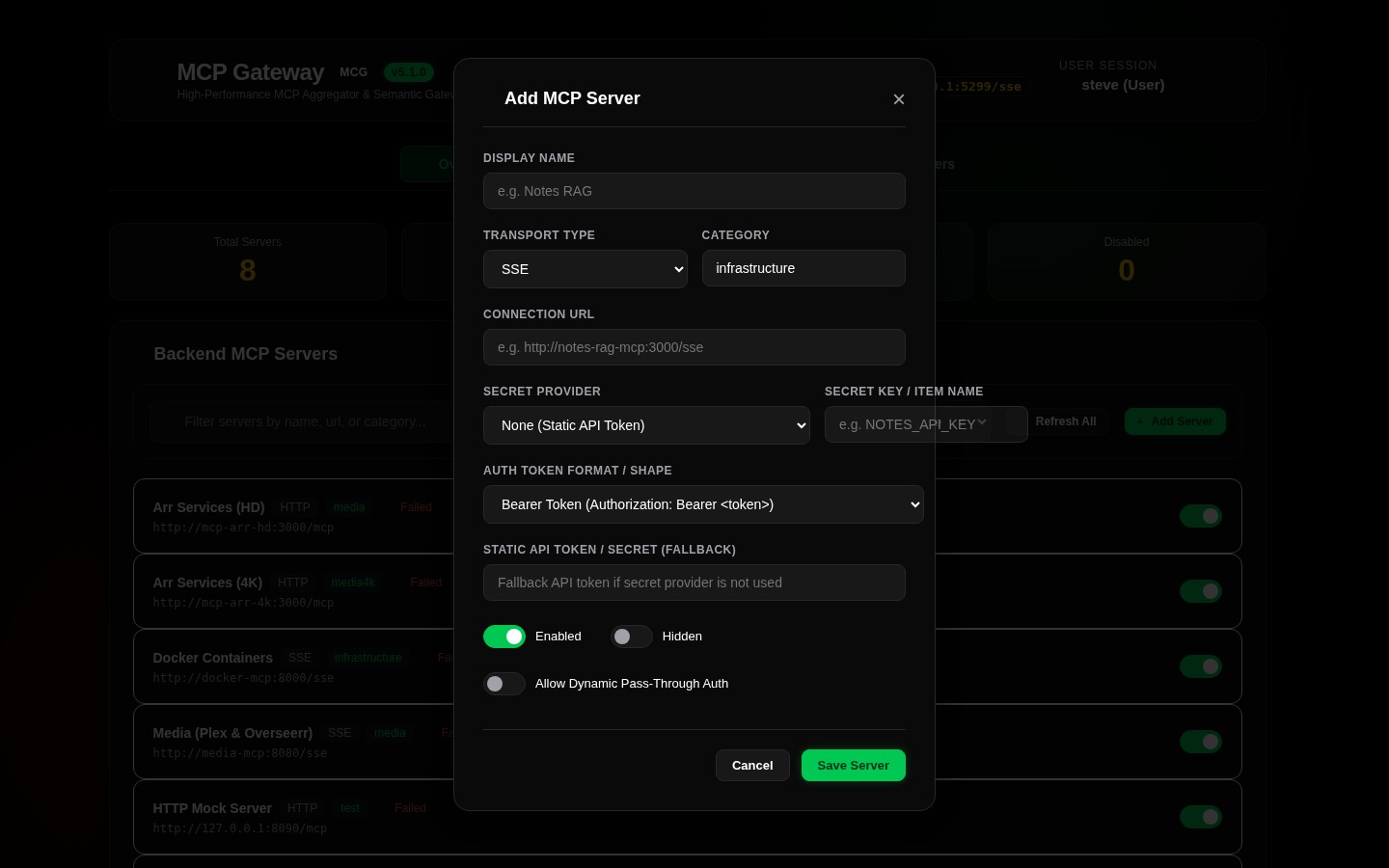
2. Click + Add Server (top right).
3. Complete the Add MCP Server modal:
- Display Name: User-friendly label (e.g., Home Assistant).
- URL: Backend SSE endpoint or HTTP server (e.g., http://ha-mcp:8086/mcp).
- Transport Type: Select sse (stateful) or http (stateless).
- Category: Classify the server (e.g., homecontrol, infrastructure, development).
- API Token/Key: Downstream credentials.
- Secret Provider: Secret retrieval method (None, Vault, WindowsRegistry, or Environment). See Pluggable Secret Retrievers.
4. Click Save Server. The router registers the server and initializes connections.
Method B: Static JSON Seeding (custom_servers.json)
For declarative configurations:
1. Create custom_servers.json in the /app/data/ directory.
2. Use this structure:
[
  {
    "id": "my-mcp-server",
    "displayName": "My Custom Server",
    "url": "http://10.0.0.15:3000/sse",
    "type": "sse",
    "category": "infrastructure",
    "enabled": true,
    "hidden": false,
    "apiKey": "optional-bearer-or-api-key",
    "headersJson": "{\"Custom-Header-Name\": \"Header-Value\"}"
  }
]
Method C: Environment Seed Migration
The gateway auto-seeds common services on first run if environment variables exist (e.g., HOMEASSISTANT_TOKEN, PLEX_TOKEN, SEERR_API_KEY). Refer to Program.cs.
Method D: Dynamic Docker Label Auto-Discovery (mcp.* labels)
If the router accesses the Docker daemon (/var/run/docker.sock), it dynamically registers backend containers labeled mcp.enabled=true.
services:
  my-service-mcp:
    image: ghcr.io/org/my-service-mcp:latest
    container_name: my-service-mcp
    restart: unless-stopped
    networks:
      - net_mcp
    labels:
      - mcp.enabled=true
      - mcp.id=myservice
      - mcp.displayName=My Custom Service
      - mcp.port=8080
      - mcp.type=sse
      - mcp.path=/sse
      - mcp.categories=infrastructure,custom
Supported Docker Labels
| Label | Required | Default | Description |
|---|---|---|---|
mcp.enabled |
Yes | false |
Enables router auto-discovery. Must be "true". |
mcp.id |
Yes | — | Unique server identifier (e.g., /myservice). |
mcp.port |
Yes | — | Internal container port (e.g., 8080, 3000). |
mcp.displayName |
No | Value of mcp.id |
Friendly name for dashboard and tools. |
mcp.type |
No | sse |
Transport type (sse, http, or stdio). |
mcp.path |
No | /sse (or /mcp) |
Message dispatch path. |
mcp.categories |
No | general |
Comma-separated categories for RBAC. |
mcp.authType |
No | none |
Authentication header format (bearer, x-api-key, custom-header). |
mcp.secretProvider |
No | none |
Secret retriever backend (vault, env, none). |
mcp.secretKey |
No | — | Vault path or environment variable for the API key. |
📡 2. Routing Modes
Connect clients via these SSE endpoints:
| Route Path | Mode | Description |
|---|---|---|
/sse or /sse?meta=true |
Meta-Mode (Default) | Hides backend tools during bootstrap; exposes only search_tools and execute_tool. Conserves context window. |
/sse?meta=false |
Full-List Mode | Exposes all underlying tools from all connected servers. |
/{targetServerId} |
Target-Specific Proxying | Proxies connections directly to the specified target server (e.g., /docker or /ha). |
/admin or /router-admin |
Admin MCP Server | Virtual in-process control plane providing 10 consolidated entity tools for autonomous agents to manage router state. |
For transport protocol comparisons (
sse,http,stdio), concurrency, security policies, and error recovery, see Transport Capability & Configuration Guide.
Gateway Client Setup Examples (/sse)
Claude Desktop Configuration (config.json)
{
  "mcpServers": {
    "mcg": {
      "command": "npx",
      "args": ["-y", "@modelcontextprotocol/client-sse", "http://localhost:8026/sse"]
    }
  }
}
Antigravity CLI Configuration (.gemini/settings.json)
{
  "mcpServers": {
    "mcg": {
      "url": "http://localhost:8026/sse",
      "type": "sse",
      "trust": true,
      "serverUrl": "http://localhost:8026/sse"
    }
  }
}
🤖 3. Admin MCP Server & Autonomous Agent Administration
The Admin MCP Server (/admin, /admin/sse, /mcg-admin) is an in-process virtual MCP server exposing 10 consolidated tools enabling autonomous AI agents (Claude Desktop, Cursor, Cline, Windsurf, Antigravity) to configure and administer the entire gateway programmatically.
Consolidated Admin Tools Reference
| Tool Name | Actions | Description | Key Parameters |
|---|---|---|---|
manage_servers |
list, get, create, update, delete, toggle, reconnect, reconnect_all |
Manage backend MCP server registrations, URLs, transports, categories, and secret providers. | action, id, name, url, type, category, enabled, secret_provider, secret_key |
manage_appkeys |
list, get_limits, create, revoke |
Issue and revoke API AppKeys, enforce key quotas, expiration, and configure capability scopes. | action, name, scopes, expires_in_days, prefix |
manage_clients |
list, register, delete |
Manage dynamic OAuth 2.0 client registrations. | action, client_id, client_name, redirect_uris, grant_types, scopes |
manage_policies |
list, save, delete |
Manage role-based access control (RBAC) authorization policies across servers and categories. | action, policy_id, role_name, server_id, category, allowed, priority |
manage_group_mappings |
list, save, delete |
Map external Active Directory SIDs or OIDC SSO groups to internal security roles. | action, id, source_type, external_identifier, role_name, priority |
manage_providers |
list, save_secret, test_vault, save_auth, test_ldap |
Configure and verify HashiCorp Vault, Windows Registry DPAPI, Env, Active Directory LDAP, and OIDC providers. | action, provider_type, vault_address, vault_token, ldap_server, bind_dn |
manage_settings |
get, update |
Update dashboard UI branding (title, icon, accents) and semantic vector embedding providers/models. | action, dashboard_title, dashboard_icon, embedding_provider, embedding_model |
manage_custom_files |
list, get, save, delete |
Manage declarative prompt templates and resource files in persistent storage (/app/data/). |
action, file_type (prompts or resources), filename, content |
manage_system |
diagnostics, get_logs, clear_logs, query_audit |
Retrieve server diagnostics, inspect/clear in-memory gateway logs, and query persistent audit log entries. | action, limit, level, category, source_user, start_date, end_date |
test_tool_call |
execute |
Execute and test capabilities against downstream MCP servers via the testbench engine. | action, server_id, tool_name, arguments |
Admin MCP Server Client Setup Examples
Claude Desktop (claude_desktop_config.json)
{
  "mcpServers": {
    "mcg-admin": {
      "command": "npx",
      "args": ["-y", "@modelcontextprotocol/client-sse", "http://localhost:8026/admin"]
    }
  }
}
Cursor (~/.cursor/mcp.json) / Windsurf / Cline (cline_mcp_settings.json)
{
  "mcpServers": {
    "mcg-admin": {
      "url": "http://localhost:8026/admin",
      "headers": {
        "Authorization": "Bearer mcp-adm-Xk9L2mPq-7vN3wZ8aB1cE4fG9"
      }
    }
  }
}
Antigravity CLI (.gemini/settings.json)
{
  "mcpServers": {
    "mcg-admin": {
      "url": "http://localhost:8026/admin",
      "type": "sse",
      "trust": true,
      "serverUrl": "http://localhost:8026/admin"
    }
  }
}
🔍 4. Semantic Search
In Meta-Mode, clients must semantically search for tools before execution.
Search Flow:
- Tool Inquiry: Client calls
search_tools(query: "restart actual budget container"). - Hybrid Scoring Engine:
- Computes semantic similarity of tools using a Local ONNX model (
all-MiniLM-L6-v2) or LiteLLM/OpenAI APIs. - Applies Keyword Boosting (exact phrase match: +2.0 weight; individual words: +1.0/+0.5 weight).
- Execution Routing: Client executes returned namespaced tools (e.g.,
docker__restart_container) viaexecute_tool.
Embeddings Configuration:
Configure via the Settings panel:
* Local ONNX (In-Process): Offline execution via Microsoft.ML.OnnxRuntime. Downloads weights on first run to /app/data/.
* OpenAI API / LiteLLM Provider: Uses remote models. Credentials are encrypted in the database via SQLite SQLCipher.
🔐 5. Authentication, Group Mapping & Unified MCP Capability Authorization
Model Context Gateway (MCG) implements a Unified Authorization Pipeline across MCP capabilities:
- Tools: tools/list, tools/call
- Prompts: prompts/list, prompts/get
- Resources: resources/list, resources/read, resources/templates/list
- Completions: completion/complete
All requests undergo this pipeline:
1. AppKey Scope Validation: Validates scopes (*, all, server:{id}, tool:{id}, prompt:{id}, resource:{id}, resource_template:{id}, completion:{id}).
2. Admin SID Bypass: Checks caller SIDs against Admin:GroupSid (e.g., S-1-5-32-544).
3. Database Access Policies: Evaluates allows and denies in AccessPolicies and sp_EvaluateUserAccess against mapped groups/SIDs.
4. Discovery Filtering: Automatically omits unauthorized items from list endpoints.
5. Fail-Closed Default: Unknown capabilities or targets return audited 403 errors without data leakage.
Identity Providers
- Active Directory (Kerberos/NTLM): Resolves caller identities via AD SIDs (
WindowsIdentity). - OIDC Header Proxy: Extracts SSO headers (e.g.,
Remote-User,Remote-Groups) from reverse proxies.
Group & SID Mapping Policy
External groups map to internal groups via the GroupMappings table (Settings -> Identity & Auth):
1. Create Mapping: Map an AD SID or OIDC group to an internal security group (admin, operator, readonly).
2. Evaluate Access: Capability invocation triggers access evaluation against the user's mapped groups.
Standalone Network & Hybrid Authorization (AdminPolicy)
The router supports a hybrid administrative security model:
1. Enterprise Mode (with Active Directory / OIDC):
- Evaluates caller groups against Admin:GroupSid (e.g. S-1-5-32-544), Admin:Groups (e.g. ["full_admin", "Administrator"]), or dynamic GroupMappings.
- Admin AppKeys with all or admin scopes owned by an administrator are authorized as Administrator.
2. Standalone Mode (No External IDP Configured):
- When no external IDP is active, administrative endpoints (/admin, /api/servers, etc.) permit requests originating from configured networks (Admin:StandaloneAllowedNetworks).
- Default allowed networks: Loopback (127.0.0.1, ::1).
- Configurable in appsettings.json or environment variables for LAN subnets (e.g., 10.0.0.0/8, 192.168.1.0/24) or 0.0.0.0/0 for centralized self-hosted setups:
ADMIN__STANDALONE_ALLOWED_NETWORKS__0="127.0.0.1"
ADMIN__STANDALONE_ALLOWED_NETWORKS__1="192.168.1.0/24"
- Callers from non-whitelisted remote networks must present an AppKey with administrative credentials.
AppKey Credentials & Compact Taxonomy
The router generates concise, human-friendly, and cryptographically secure Base62 AppKeys (~32–34 characters) with semantic prefixes.
AppKey Taxonomy Table
| Key Type | Prefix | Description | Example |
|---|---|---|---|
| Admin Key | mcp-adm- |
System administrator with full control (all, admin) |
mcp-adm-Xk9L2mPq-7vN3wZ8aB1cE4fG9 |
| Global Key | mcp-glb- |
Gateway-wide tool execution across all servers (all, *) |
mcp-glb-R4t8W1yU-9pM2nQ6sD8fH3jK5 |
| Domain Scoped | mcp-{domain}- or mcp-grp- |
Restricted to a specific group/category (e.g., group:devops) |
mcp-devops-T5v7P2mX-3kL9aB1cE4fG8hJ |
| Personal / User | mcp-usr- |
Personal user key tied to a specific username or SID | mcp-usr-A7d9F2kL-8xP1mC3vT5bN6mQ2 |
| Server Scoped | mcp-srv- |
Restricted to a single target backend MCP server | mcp-srv-docker-K4m8X2pL-9vN3wZ8aB1cE |
Cryptographic Design, Entropy & Fast Lookup
- Token Format:
{prefix}{selector_8chars}-{secret_16chars}. - Base62 Encoding: Uses the 62-character alphabet (
0-9,A-Z,a-z) generated viaRandomNumberGenerator. - Entropy: Provides ~143 bits of entropy (8-char selector ~48 bits + 16-char secret ~95 bits).
- Sub-Millisecond Prefix Indexing: The
KeyPrefixdatabase column stores{prefix}{selector_8chars}for indexed lookups without full table scans. - Constant-Time SHA-256 Verification: Keys are verified via
CryptographicOperations.FixedTimeEqualsagainst the stored SHA-256 hash inAppKeys.EncryptedKey. - Declarative Seeding: Administrators can seed custom admin keys on startup via
MCG_ADMIN_AUTH_KEYorMCG_ADMIN_KEY.
Scope Granularity
all/*/mcp_client: Full access to all backend servers.server:<serverId>/<serverId>: Full access to a specific backend.category:<name>/group:<name>: Dynamic access to capabilities of all servers in the specified category.tool:<name>,prompt:<name>,resource:<uri>: Pinpoint access to specific capabilities.- Dynamic Membership: Category scopes evaluate server memberships in real time. Changes to server categories apply instantly.
- Creation Validation: Category scopes are validated against registered categories during credential creation. Unknown categories yield a 400 Bad Request unless admin-provisioned.
Master Key Lifecycle & Dynamic Database Re-Encryption
The router manages database envelope encryption keys through transparent lifecycle stages:
- Key Source Detection (
KeySource): KeySource.External: Provided via HashiCorp Vault bootstrapping (VAULT_ADDR), container environment variable (MCG_MASTER_KEY), or secret file mount (MCG_MASTER_KEY_FILE). Configuration changes in Web UI are locked.KeySource.Configured: Explicitly set by an administrator and saved to./data/.master.key.KeySource.AutoGenerated: Auto-generated on initial boot and saved to./data/.master.key. A non-blocking warning badge is surfaced in the Web UI.- Dynamic In-Place Database Re-Encryption:
Administrators can set a custom Master Key via the Web UI (
POST /api/config/master-key) or Admin MCP Server (manage_system(action: "set_master_key", newKey: "...")). The gateway: - Decrypts all existing provider configs, server credentials, and user secrets with the current key.
- Re-encrypts all rows atomically using the new master key.
- Overwrites
./data/.master.keyand transitionsKeySourcetoConfigured.
For detailed rules and pipelines, see the AppKey Scopes & Authorization Guide.
CORS & Cross-Origin Security Configuration
By default, the gateway restricts CORS to local development origins (http://localhost:3000, http://localhost:5000, https://localhost:5001).
For production, configure allowed origins via the CORS_ALLOWED_ORIGINS (or AllowedOrigins) environment variable/setting:
- CORS_ALLOWED_ORIGINS: Delimited list of allowed URLs (e.g., https://my-mcp-dashboard.internal, https://cursor-plugin.internal).
🔑 6. Pluggable Secret Retrievers
The router dynamically fetches downstream API keys and passwords via pluggable retrievers to prevent plaintext storage in the database.
The CompositeSecretRetriever resolves secrets from:
1. HashiCorp Vault (KV v2): Fetches secrets via path configurations (e.g., /secret/data/mcp/plex) with AppRole/Token auth and JIT token renewal.
2. Windows Registry (DPAPI): Retrieves DPAPI-secured strings from registry hives (HKLM).
3. Environment Variables: Resolves secrets bound as container environment variables (env:MY_SECRET).
[!TIP] For configuration recipes, AppRole policies, and AES-256-GCM encryption architecture, see docs/secret-providers.md.
Configuration
- Register the secret in your store (e.g., environment variable
DOCKER_API_KEY=my-secret). - In the Add/Edit Server modal, select
Environmentfor Secret Provider and enterDOCKER_API_KEYunder SecretItemKey. - The gateway fetches, decrypts, and caches the token (
IMemoryCachewith rolling TTL) at execution time.
🧪 7. Developer Test Bench & Diagnostics
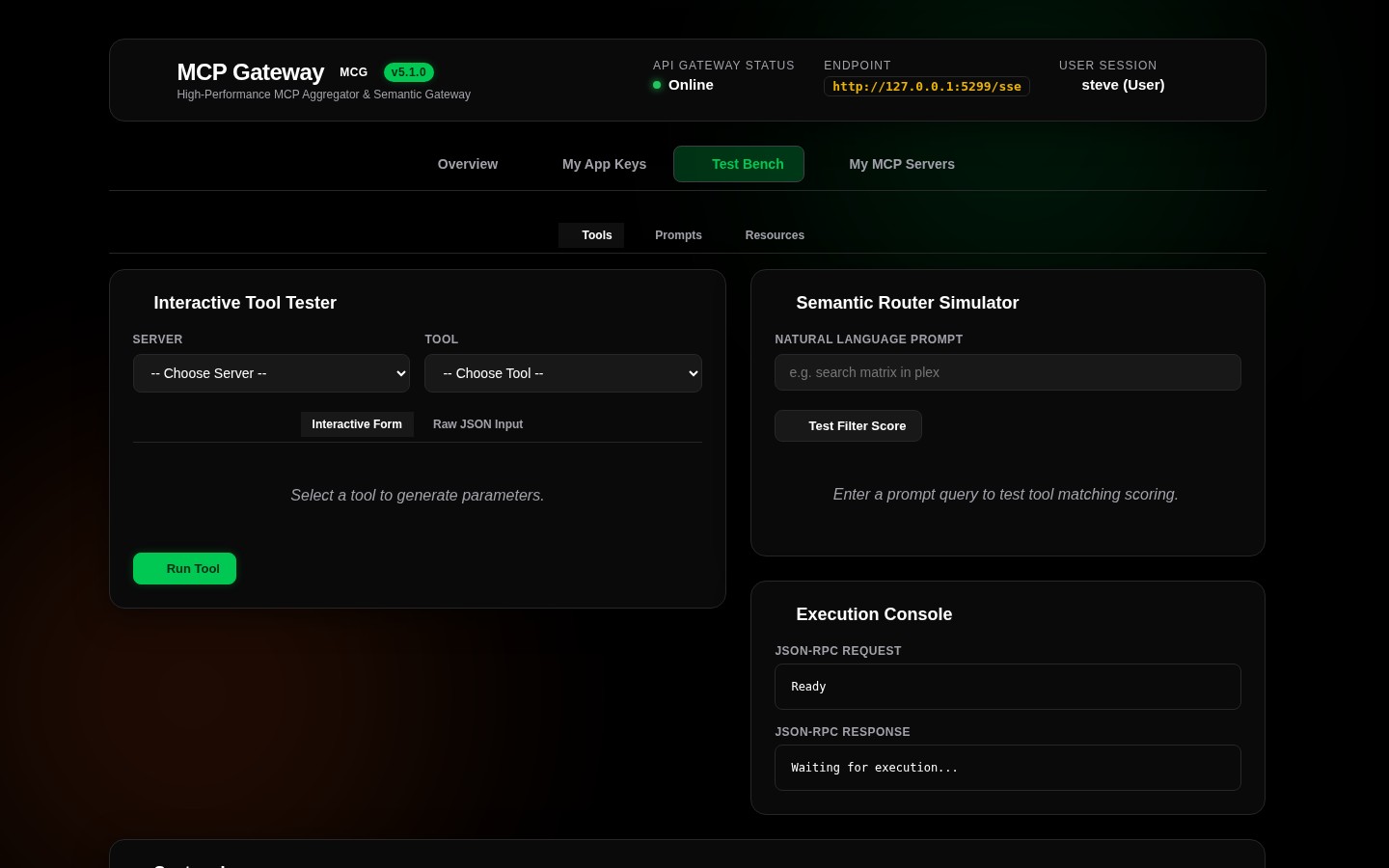
The Web Dashboard includes a developer environment to debug and verify setups:
- Interactive Form Builder: Generates forms matching the JSON schemas of registered backend tools.
- Logs Console: Thread-safe, real-time console displaying JSON-RPC traffic, request IDs, and security classifications.
- Search Simulator: Evaluation panel to test queries against the semantic search engine and inspect scores.
- Direct JSON-RPC Console: Live terminal to execute raw JSON-RPC 2.0 requests against the router.
- Resource & Prompt Testers: Dedicated interfaces to read virtual resources and evaluate prompt templates.
🗄️ 8. Database Engine Support & Deployment
For SQLite, MS SQL Server, and MySQL dialect specifications, the 12-table Entity-Relationship Diagram (ERD), stored procedure catalogs, AES-256-GCM envelope encryption, and Docker Compose configurations, see the Database Provider Support & Deployment Matrix.
📋 9. Software Requirements Specification & Automated Test Catalog
For requirements traceability, feature proofs, guardrails, and verified invariants across test suites, reference: * Software Requirements Specification (SRS) & Test Verification Catalog * Test Catalog & Annotation Developer Guide
⚡ 10. Universal Setup Skill (mcg-setup)
The mcg-setup skill adheres to the AgentSkills.io open standard, enabling any AI coding or operations assistant (Antigravity, Claude Code, Cursor, Cline, Windsurf, Copilot CLI) to guide administrators through installing, configuring, and bootstrapping Model Context Gateway (MCG) in any workspace without cloning or compiling the repository source code.
Zero-Clone Installation
To install the skill into any project or workspace directory:
mkdir -p .agents/skills/mcg-setup && curl -fsSL https://raw.githubusercontent.com/spelech/model-context-gateway/main/skills/mcg-setup/SKILL.md -o .agents/skills/mcg-setup/SKILL.md
Guided 6-Phase Deployment Workflow
When invoked (e.g. "Set up Model Context Gateway for my environment"), the skill executes a structured 6-phase workflow:
- Automated Environment Probing: Probes the host OS, Docker daemon socket (
/var/run/docker.sock), HashiCorp Vault (VAULT_ADDR), and Active Directory domain context (USERDNSDOMAIN) before asking the user for configuration details. - Hosting Platform Selection: Guides deployment to Docker Container / Docker Compose (Linux, macOS, WSL2, Home-Lab) or Windows Server IIS / Windows Service (with in-process ANCM and DPAPI).
- Configuration Paradigm: Explains and helps choose between Environment Variables (immutable, 12-factor
.env) and Web UI & Database (dynamic zero-downtime hot reloading & Admin MCP server). - Identity & Network Topology:
- Standalone / Home-Lab Mode: Configures SQLite database (
data/mcg.db) and loopback/LAN CIDR subnet authorization (Admin:StandaloneAllowedNetworks). - Enterprise Mode: Configures Active Directory LDAP or OIDC forward-auth reverse proxies (Authentik, PocketID, Authelia, Keycloak) with MSSQL, MySQL, or Vault KV v2.
- Artifact Generation & Secret Scaffolding:
- Generates cryptographically secure 256-bit
MCG_MASTER_KEY(openssl rand -base64 32or PowerShell crypto RNG). - Generates production
docker-compose.yml,web.configwith unbuffered SSE (responseBufferLimit="0"),.env, andappsettings.Production.json. - Health Verification & Client Integration:
- Verifies gateway reachability (
GET /healthandGET /sse). - Outputs ready-to-copy client JSON configurations for Claude Desktop, Cursor, Cline, and Windsurf for both the Meta-Mode Gateway (
/sse) and Admin MCP Server (/admin).
Bundled Scaffold Templates
The skill includes pre-tested scaffold templates under skills/mcg-setup/templates/:
- docker-compose.yml: Production container deployment with SQLite volume mount and Docker socket pass-through.
- web.config: IIS ASP.NET Core In-Process module configuration with unbuffered SSE streaming.
- .env.example: Standardized environment variable template with master key, provider, and network settings.
- appsettings.Production.json.example: Production ASP.NET Core configuration snippet.
🤖 11. Universal Admin MCP Automation Skill (mcg-admin)
The mcg-admin skill enables AI coding assistants and automation pipelines to connect directly to the in-process Admin MCP Server (/admin/sse or /mcg-admin/sse) to configure, manage, and verify any gateway deployment from a blank slate with zero human dashboard interaction.
Zero-Clone Installation
mkdir -p .agents/skills/mcg-admin && curl -fsSL https://raw.githubusercontent.com/spelech/model-context-gateway/main/skills/mcg-admin/SKILL.md -o .agents/skills/mcg-admin/SKILL.md
7-Phase Autonomous Administration Engine
- Gateway Diagnostics: Connects via
Authorization: Bearer mcp-adm-prod-bootstrap-token-99and runsmanage_system(action: "diagnostics"). - Secret Provider Provisioning: Configures HashiCorp Vault KV v2 (Token or AppRole auth with
test_vaultvalidation) or Built-in AES-256-GCM Master Key. - Auth Provider Provisioning: Configures Authentik / Authelia Forward-Auth, Keycloak OIDC, Microsoft Entra ID (Azure AD), or Active Directory LDAPS (with
test_ldapvalidation). - RBAC & Group Mappings: Maps external SSO groups/SIDs to internal roles (
manage_group_mappings) and sets fine-grained allow/deny policies (manage_policies). - Semantic Search & Embeddings: Configures OpenAI, Azure OpenAI, or local Ollama embeddings (
manage_settings). - Backend MCP Servers & AppKeys: Registers backend servers (
manage_servers), issues developer AppKeys (manage_appkeys), and provisions OAuth clients (manage_clients). - End-to-End Verification: Tests live tool execution through the gateway (
test_tool_call) and reviews security audit trails (manage_system(action: "query_audit")).
[!TIP] For complete reference architectures, ready-to-use JSON payloads, and automated cURL/PowerShell scripts, see the Admin MCP Automation & Provider Configuration Guide.
👁️ 11. Observability & PII Audit Logging
Model Context Gateway includes built-in observability features with a strong focus on privacy and security.
PII Sanitization
The PiiSanitizer automatically scrubs sensitive information before it reaches the logs:
- Redacted Items: Bearer tokens, API keys, passwords, and authorization headers are replaced with [REDACTED].
- Safe Logging: Ensures that developer consoles and persistent log aggregators never leak downstream credentials.
Audit Logging
Administrative actions and tool executions are persistently recorded via stored procedures (e.g., sp_InsertAuditLog):
- Traceability: Records the caller's identity (user, group mapping, or AppKey), target server, tool invoked, and timestamp.
- Auditing Tool: The Admin MCP Server provides the query_audit action via the manage_system tool, allowing administrators and autonomous agents to query historical gateway logs.
🏢 12. Enterprise Identity Delegation
For complex enterprise networks, the gateway manages downstream identity flow dynamically, allowing backend services to enforce Row-Level Security (RLS) based on the user's origin identity.
Delegation Strategies
- X-Forwarded-User Propagation (Trusted Gateway Pattern): The gateway injects the authenticated caller's username (extracted from the OIDC proxy or Active Directory) into the downstream HTTP/SSE backend requests.
- Kerberos / NTLM Impersonation:
In native Windows IIS deployments, the gateway uses
S4U2Proxyto assume the inbound caller's Active Directory identity when making downstream enterprise endpoint calls. - OAuth2 / OIDC On-Behalf-Of: The gateway can act as a Confidential Client to dynamically mint or exchange tokens with Identity Providers (Azure AD, Okta, Authentik) on behalf of the user.
- Dynamic Auth Pass-Through:
When downstream services issue interactive challenges, the gateway can proxy these
dynamic_authprompts directly back to the client IDE or LLM to complete the challenge.
🐳 13. Batteries-Included Docker Environment
The official Docker image simplifies deployment of STDIO-based subprocess servers without requiring complex sidecar networking.
- Image Tag:
ghcr.io/spelech/model-context-gateway:latest-full - Embedded Runtimes: The image ships with pre-installed Node.js, Python 3,
uvpackage manager, andbun. - Use Case: Natively execute STDIO backend scripts (e.g.,
npx -y @modelcontextprotocol/server-postgres) directly from within the gateway container, minimizing network configuration overhead.
⚡ 14. Model Context Protocol Specification Alignment (MCP 2026-07-28)
Model Context Gateway strictly implements the MCP 2026-07-28 specification:
Required resultType Field
All successful JSON-RPC results return a top-level resultType discriminator:
- "complete": Indicates full execution with final tool results or resource content.
- "input_required": Signals Multi Round-Trip interactive requests requiring follow-up user input.
Multi Round-Trip Requests (MRTR)
When downstream tools or workflows require step-by-step interactive inputs (e.g. 2FA codes, interactive confirmation, parameter disambiguation):
- The gateway returns resultType: "input_required" with an array of inputRequests (id, type, message, required, schema).
- Clients reply via execute_tool using the optional inputResponses parameter matching each requested input ID.
Cacheable Results Metadata
Endpoints (tools/list, resources/list, resources/read, prompts/list) annotate responses with caching metadata:
- ttlMs: Cache time-to-live in milliseconds (default: 300000 / 5 minutes).
- cacheScope: Caching scope boundary ("session" or "global").
MCP 2026-07-28 Spec Error Codes
Error handling adheres strictly to the official taxonomy:
- -32602 (Invalid Params): Used when requested resources or parameters are not found or invalid.
- -32020 (Connection Closed): Downstream connection terminated.
- -32021 (Request Cancelled): Client or session cancelled pending request.
- -32022 (Capability Missing): Client or server lacks declared required capability.
Request Header Annotations
MCP HTTP POST endpoints enforce spec-compliant headers:
- Mcp-Method: Specifies the target RPC method (e.g., tools/call, resources/read).
- Mcp-Name: Specifies the target tool, prompt, or resource name.
- Dual-spec fallback ensures transparent backwards compatibility with legacy payloads.
Deprecated Features Cleanup
Per the 2026-07-28 specification deprecation schedule:
- Per-request log levels are supported via _meta.io.modelcontextprotocol/logLevel on incoming requests.
- Legacy logging/setLevel, roots/list, sampling/createMessage, and Admin ping methods return Method Not Found (-32601).
- Mcp-Session-Id header is deprecated on HTTP+SSE transports in favor of URL-bound session routing.
🔒 15. OAuth 2.1 Dynamic Client Registration & RFC 7591 Security
The integrated OAuth 2.0 / 2.1 authorization server complies with RFC 7591 and OAuth 2.1 standards:
- Mandatory application_type: Dynamic Client Registration (/api/register) requires explicit application_type ("web" or "native"). Public native clients default to PKCE with token_endpoint_auth_method: "none".
- Issuer Validation & Binding: Client credentials and authorization requests strictly validate and bind to the gateway's canonical issuer URL (iss).
- One-Way Secret Hashing: Client secrets are hashed using SHA-256 before storage across SQLite, MSSQL, and MySQL databases.
- Resource Metadata: RFC 9728 discovery automatically exposes authorization_servers and resource indicators.