04. Client Setup & App Key Management
The Model Context Gateway (MCG) enables AI coding assistants, IDEs, and autonomous agent frameworks to connect securely using standard Model Context Protocol (MCP) clients, secured by cryptographically hashed, scoped AppKeys.
🔑 Managing App Keys (App Keys & Security Tab)
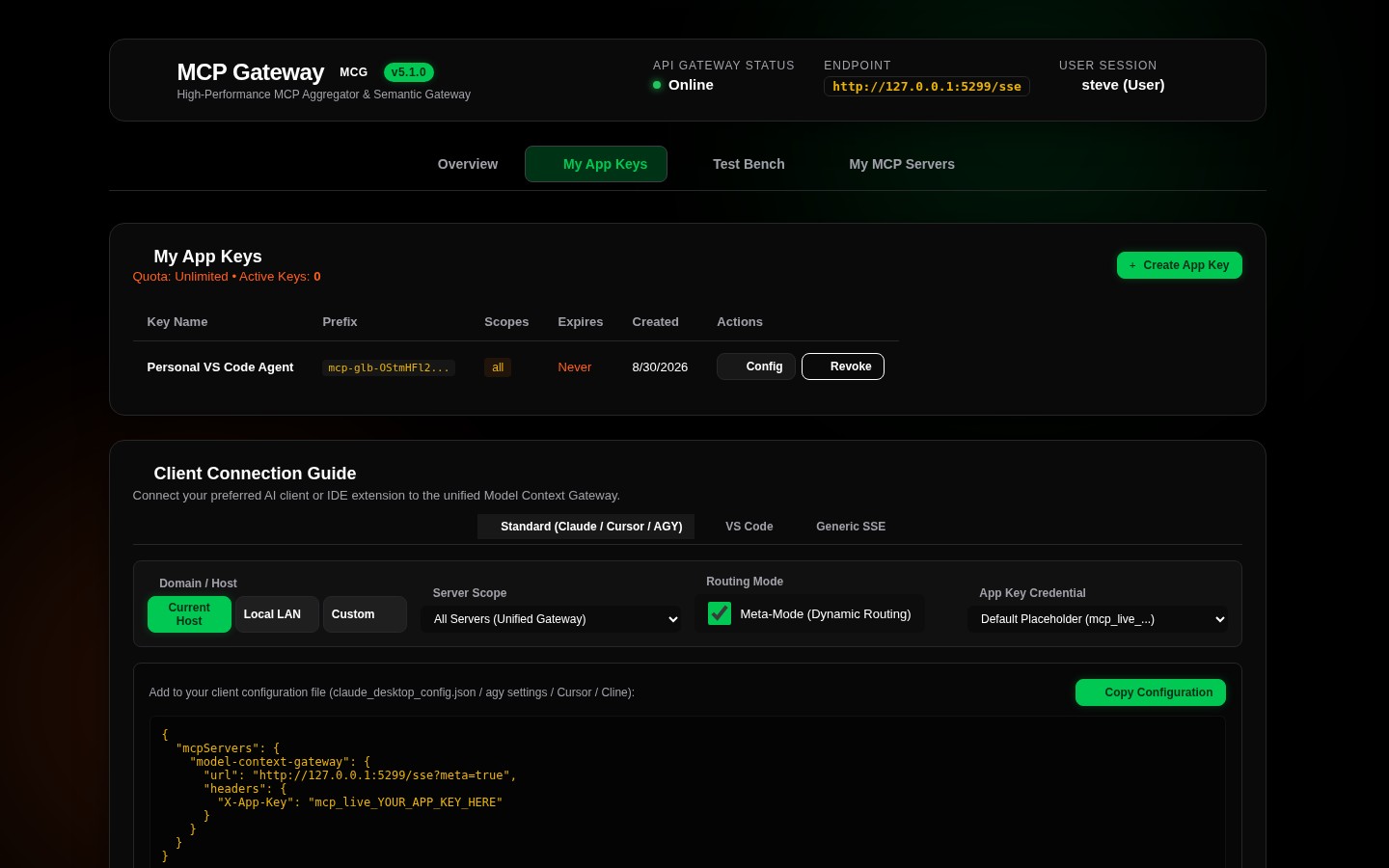
AppKeys grant external clients secure, authenticated access to the router without exposing master administrator credentials or passing raw SSO headers.
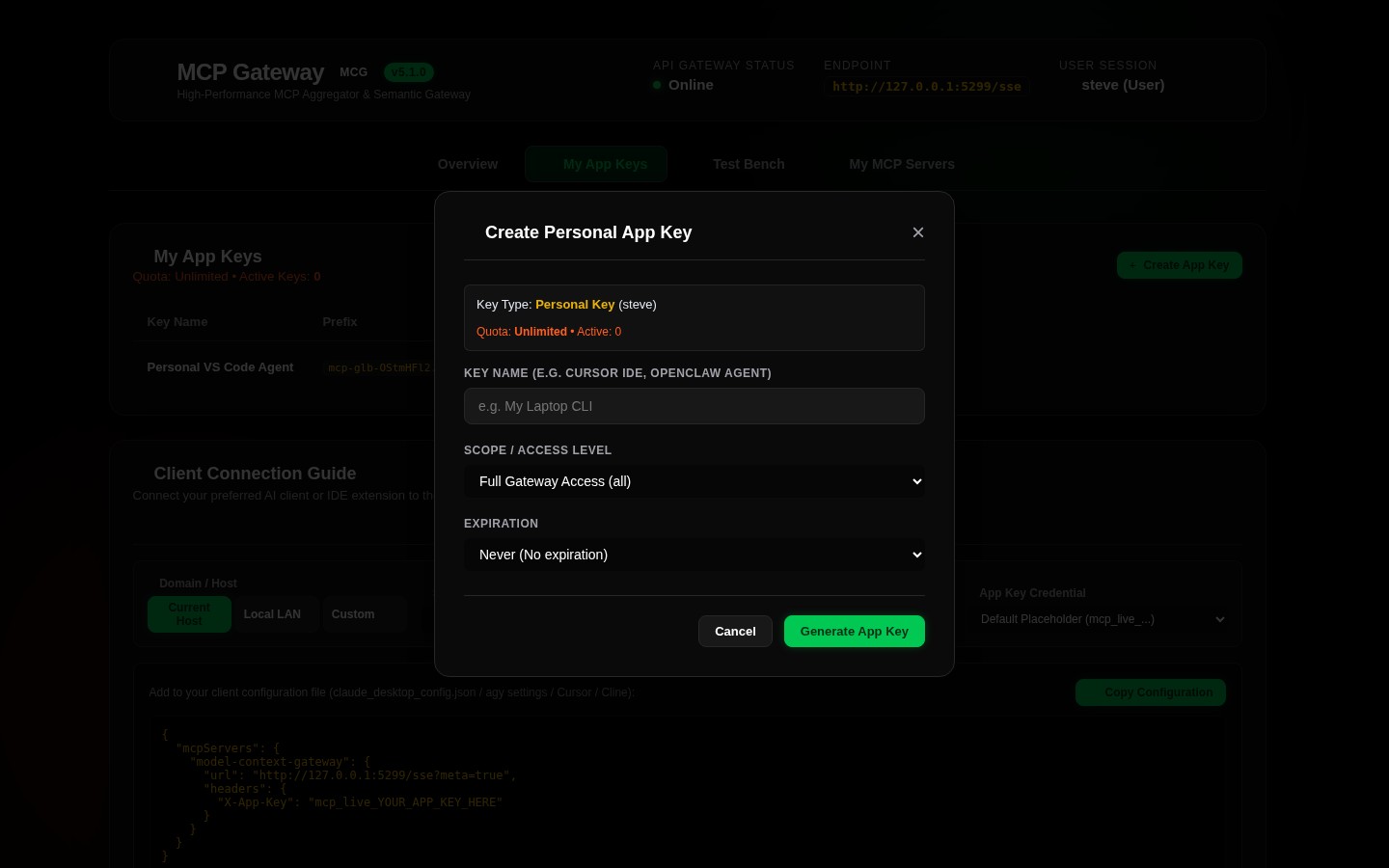
1. Generating an AppKey
- Click
App Keys & Securityin the top navigation bar. - Click
+ Generate App Keyto open the creation modal. - Configure the key parameters:
- Key Label: Descriptive identifier for the client (e.g.
Cursor IDE - MacBook,Antigravity CLI - Server 10). - Assigned User: User principal UPN to associate with audit logs and RBAC policies.
- Access Scopes: Assign least-privilege permissions (see scope grammar below).
- Expiration: Select
30 Days,90 Days,1 Year, orNever. - Click Generate Key.
- Copy the Secret Key: The plaintext key (
mcp_app_key_...) is displayed only once. Store it in your client configuration or secrets manager immediately. The database stores only the one-way SHA-256 hash.
🎯 AppKey Scope Grammar & Examples
[!TIP] For the complete formal grammar specification, evaluation order, and least-privilege persona recipes, refer to the AppKey Scopes & Authorization Guide. For the underlying database schema and hash storage model (
AppKeys), see the Database Entity-Relationship Diagram.
| Scope Pattern | Description | Example |
|---|---|---|
*, all |
Global Access: Grants unrestricted access to all servers, tools, resources, and prompts. | *, all |
admin |
Administrative Access: Grants full gateway administration rights and access to the /admin MCP server. |
admin |
category:<name> |
Category Scope: Grants access to all servers tagged with the specified category. | category:smarthome, category:media |
server:<id> |
Server Scope: Grants access to all capabilities of a specific backend server. | server:docker, server:actual_budget |
tool:<name> |
Granular Tool: Grants execution rights for a specific namespaced tool. | tool:docker__ps, tool:ha__get_state |
resource:<uri> |
Granular Resource: Grants read access to a specific virtual resource URI. | resource:mcp://docker/containers |
prompt:<name> |
Granular Prompt: Grants access to a specific prompt template. | prompt:notes__summarize |
🛠️ Dynamic Client Setup Guide
The Client Setup Guide card (available on both the Overview and App Keys & Security views) features an interactive configuration generator:
[ Target Route: Unified Meta-Mode (/sse?meta=true) ▾ ]
[ Client Tool: Cursor IDE ▾ ]  [ Host: http://10.0.0.10:8026 ]  [☑ Include X-App-Key ]
1. Cursor IDE (.cursor/mcp.json)
To connect Cursor to the unified Meta-Mode gateway:
- Create or edit
.cursor/mcp.jsonin your project root or global settings: - Restart Cursor or reload MCP servers in Cursor Settings (
Features->MCP Servers).
2. Claude Desktop (claude_desktop_config.json)
Claude Desktop connects using the official MCP inspector bridge or direct SSE transport:
- File Location:
- macOS:
~/Library/Application Support/Claude/claude_desktop_config.json - Windows:
%APPDATA%\Claude\claude_desktop_config.json - Linux:
~/.config/Claude/claude_desktop_config.json
{
"mcpServers": {
"model-context-gateway": {
"command": "npx",
"args": [
"-y",
"@modelcontextprotocol/inspector",
"http://10.0.0.10:8026/sse"
],
"env": {
"X_APP_KEY": "mcp_app_key_your_generated_secret_key_here"
}
}
}
}
3. Antigravity CLI / OpenClaw Autonomous Agent
For CLI coding agents and autonomous workflows:
# Export environment variable
export MCG_URL="http://10.0.0.10:8026/sse"
export MCG_KEY="mcp-adm-your_generated_secret_key_here"
# Connect via Antigravity CLI
agy mcp connect --url "$MCG_URL" --header "X-App-Key: $MCG_KEY"
4. VS Code / Cline / Roo Code (cline_mcp_settings.json)
In VS Code with the Cline or Roo Code extension:
{
  "mcpServers": {
    "model-context-gateway": {
      "url": "http://10.0.0.10:8026/sse",
      "headers": {
        "X-App-Key": "mcp_app_key_your_generated_secret_key_here"
      }
    }
  }
}
5. TypeScript & Python SDK Clients
TypeScript (@modelcontextprotocol/sdk)
import { Client } from "@modelcontextprotocol/sdk/client/index.js";
import { SSEClientTransport } from "@modelcontextprotocol/sdk/client/sse.js";

const transport = new SSEClientTransport(
  new URL("http://10.0.0.10:8026/sse"),
  {
    requestInit: {
      headers: {
        "X-App-Key": "mcp_app_key_your_generated_secret_key_here"
      }
    }
  }
);

const client = new Client({ name: "my-ts-agent", version: "1.0.0" }, { capabilities: {} });
await client.connect(transport);

// In Meta-Mode, search for tools dynamically
const searchResult = await client.callTool({
  name: "search_tools",
  arguments: { query: "restart container" }
});
console.log("Discovered tools:", searchResult);
Python (mcp SDK)
import asyncio
from mcp import ClientSession
from mcp.client.sse import sse_client

async def main():
    headers = {"X-App-Key": "mcp_app_key_your_generated_secret_key_here"}
    async with sse_client("http://10.0.0.10:8026/sse", headers=headers) as (read, write):
        async with ClientSession(read, write) as session:
            await session.initialize()
            tools = await session.list_tools()
            print("Connected! Available bootstrap tools:", [t.name for t in tools.tools])

asyncio.run(main())
👥 Registered Clients Registry (RegisteredClientsCard)
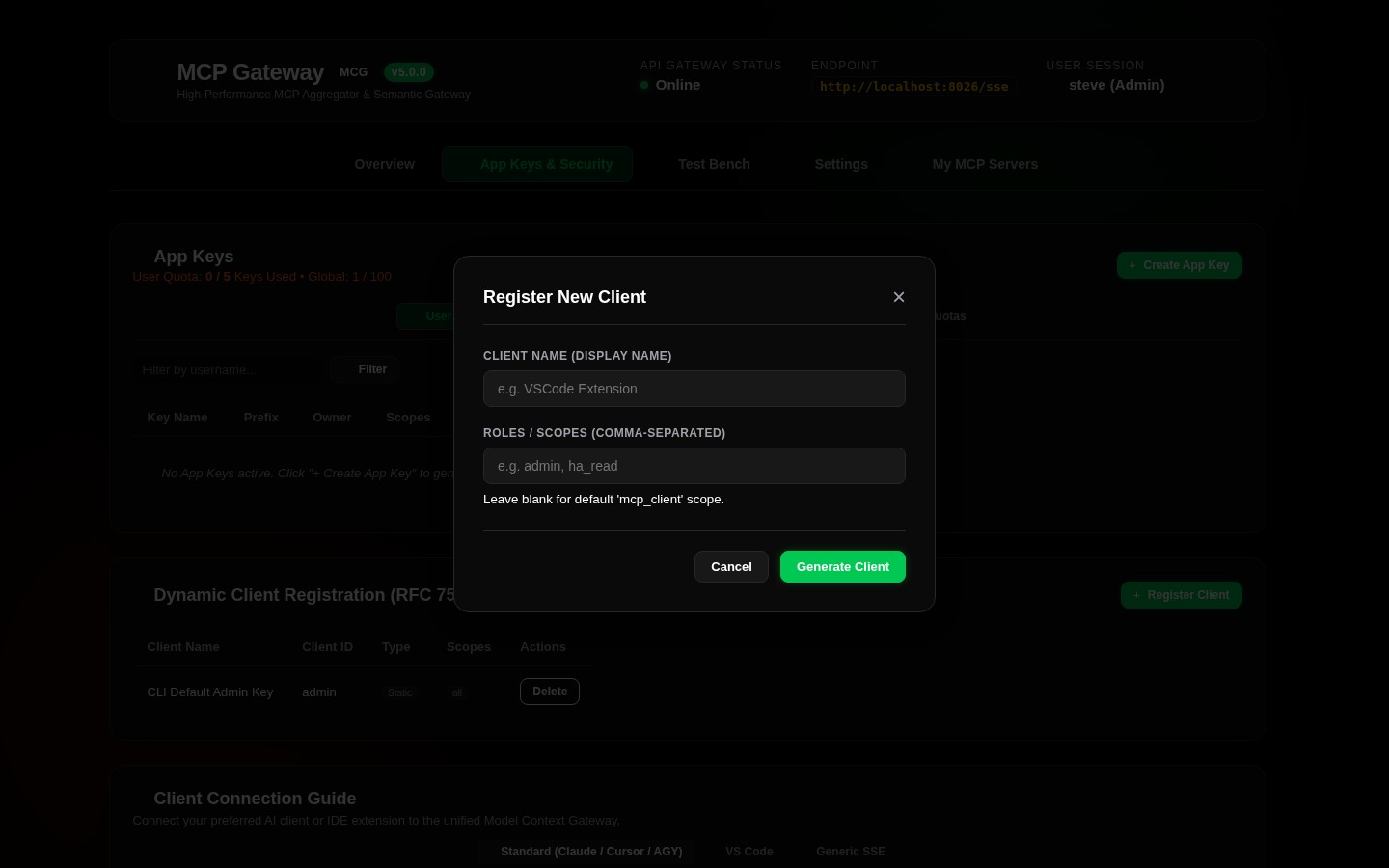
The Registered Clients table in the App Keys & Security view provides real-time visibility into active client connections:
- Client Name & ID: Reported client user-agent or application name.
- Protocol Version: Negotiated MCP specification version (e.g.
2026-07-28). - Client IP Address: Source IP address of the client connection.
- Active Sessions: Number of open SSE / HTTP sessions.
- Last Seen: Live timestamp of the most recent JSON-RPC activity.
🛡️ Interactive OAuth 2.0 Consent Screen
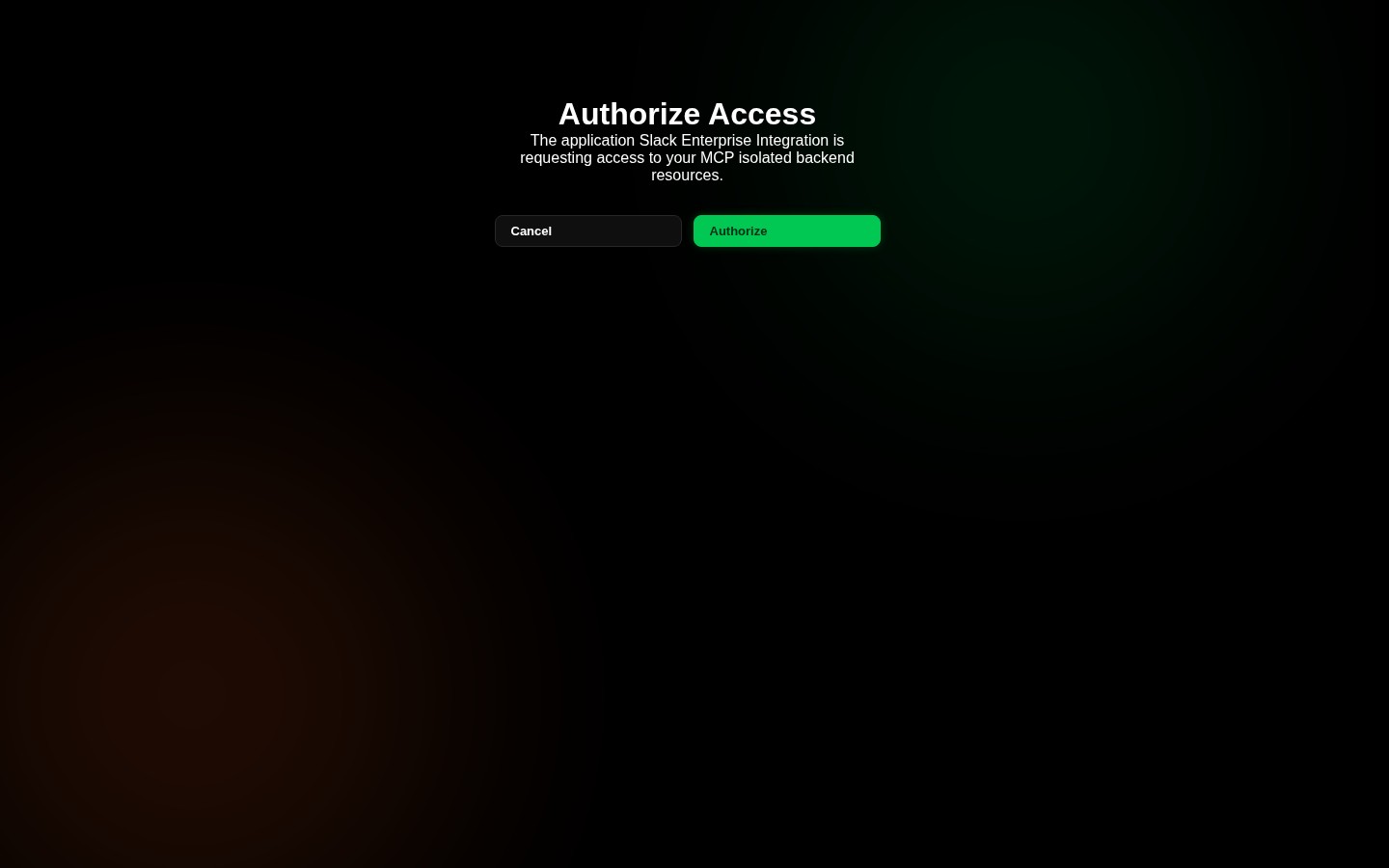
When third-party multi-tenant applications or developer tools initiate the standard OAuth 2.0 Authorization Code flow against /oauth/authorize or /connect/authorize, the gateway presents the interactive consent authorization screen at /consent. End-users can inspect the requested client identity, verify backend scope boundaries, and approve or deny access in real time.