
Server Management & Secret Providers
The Model Context Gateway (MCG) manages connections to downstream Model Context Protocol (MCP) servers. It supports multiple transport types (SSE, HTTP, STDIO) and integrates with enterprise secret providers to eliminate hardcoded plaintext credentials.
TIP
Need a configuration recipe for your server? Check the MCP Server Authentication & Integration Cookbook for quick decision tables and configuration examples for Docker, Home Assistant, Postgres, Kubernetes, and more.
➕ Registering a New Backend Server
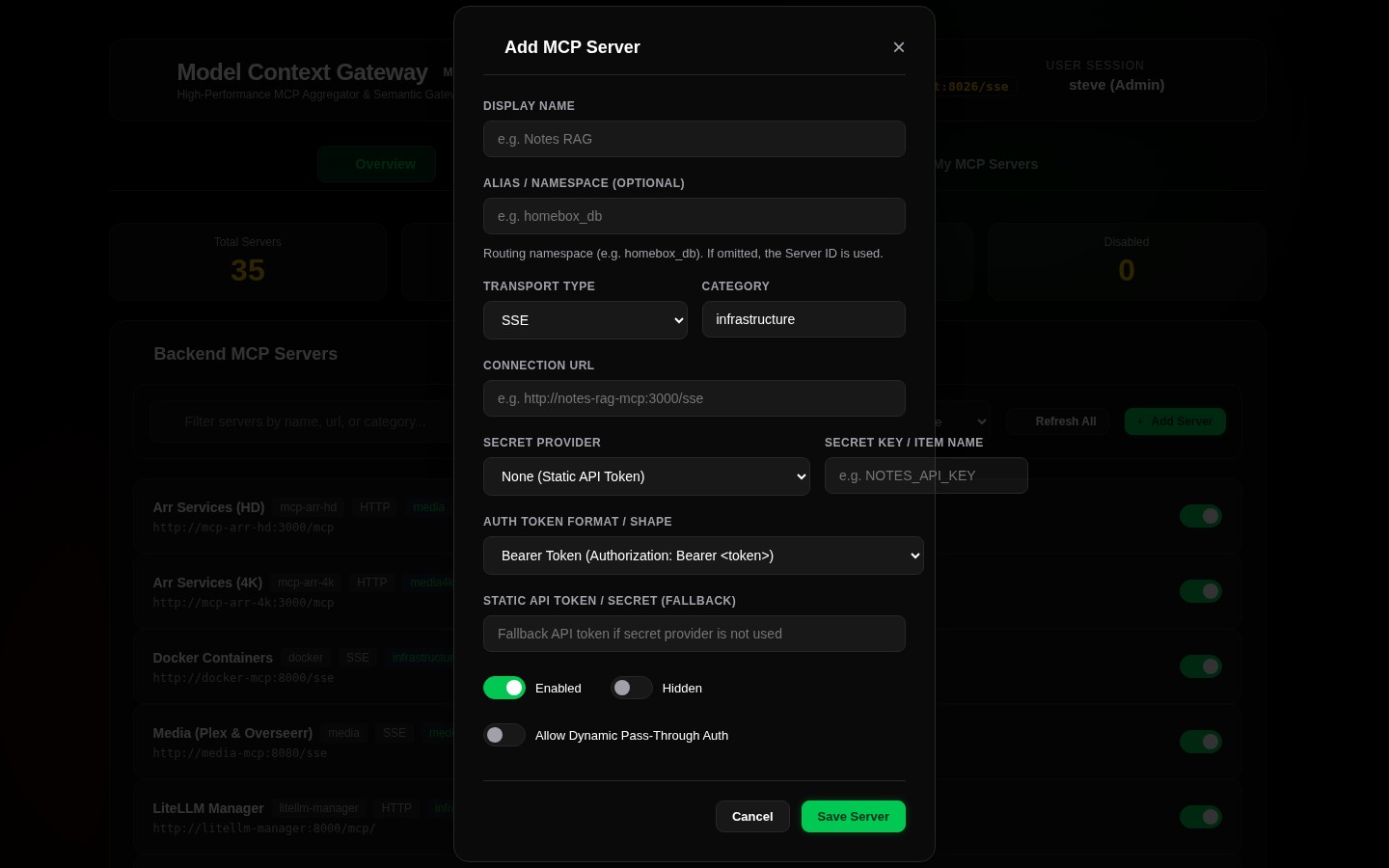
Click the + Add Server button in the dashboard toolbar to open the registration modal:
Core Configuration Parameters
| Field | Description | Example |
|---|---|---|
Server Identifier (id) | Unique identifier string. Used to namespace tools ({id}__{tool} or {id}/{tool}) and route requests (/{id}). | docker, homeassistant, plex |
| Display Name | Human-readable label displayed across status cards and test bench selectors. | Docker Infrastructure Daemon |
| Transport Type | Communication protocol: SSE, HTTP, or STDIO. | SSE |
| Endpoint / Command | Downstream URL (for SSE / HTTP) or local CLI executable path (for STDIO). | http://docker-mcp:8080/sse or npx |
| Categories | Comma-separated tags used for catalog grouping and category-scoped AppKey evaluation. | Infrastructure, Smart Home |
| Secret Provider | Secret resolution strategy: None, Environment, Vault, or WindowsRegistry. | Vault |
| Custom Headers | Optional JSON key-value map of HTTP headers injected into downstream requests. | {"Authorization": "Bearer token"} |
🚀 Transport Protocols & Lifecycle Behaviors
TIP
For complete technical specifications and child process lifecycle policies, see the Transport Capability & Configuration Guide.
1. Server-Sent Events (SSE)
- Usage: Stateful streaming connection for real-time notifications, progress events, and long-running tool executions.
- Endpoint Pattern:
http://host:port/sse - Session Lifecycle: MCG maintains a persistent SSE stream to the backend. It tracks session IDs and routes JSON-RPC messages bi-directionally between connected AI clients and the downstream server.
2. HTTP JSON-RPC (HTTP / Streamable)
- Usage: Stateless HTTP POST communication using standard JSON-RPC 2.0 payloads.
- Endpoint Pattern:
http://host:port/mcporhttp://host:port/v1/jsonrpc - Session Lifecycle: The gateway executes an independent HTTP request for each tool call, prompt evaluation, or resource read. Ideal for containerized microservices and stateless functions.
3. Local Subprocess (STDIO)
- Usage: Spawns local CLI tools, Node.js scripts, Python binaries, or container wrappers communicating over standard input/output (
stdin/stdout). - Command Syntax: Executable name with command-line arguments (for example,
npx -y @modelcontextprotocol/server-filesystem /shared/data). - Secret Protection: MCG injects resolved credentials directly into the child process environment variables. Secrets never appear in command-line arguments or system process listings (
ps aux).
🔐 Enterprise Secret Providers
MCG provides pluggable secret resolution strategies to ensure no credentials are stored in plaintext:
1. Direct Static Key (None)
- Credentials are stored directly in the server configuration.
- All sensitive strings are encrypted at rest with AES-256-GCM envelope encryption.
- Recommended for local testing, public APIs, or unauthenticated internal networks.
2. Environment Variables (Environment / Env)
- Resolves secrets dynamically from environment variables on the gateway host or container.
- Configuration: Specify the environment variable name (e.g.
HOME_ASSISTANT_LONG_LIVED_TOKEN). - Supports prefix notation (e.g.
ENV:DOCKER_SECRET_KEY).
3. HashiCorp Vault KV v2 (Vault / HashiCorpVault)
- Integrates directly with HashiCorp Vault Key-Value Version 2 (
kv-v2) engines. - Authentication: Supports AppRole authentication (
roleIdandsecretId) or direct Vault tokens. - Features:
- Automatic Token Renewal: Checks token time-to-live before each request. Automatically renews authentication if less than 5 minutes remain.
- In-Memory Cache: Caches retrieved secrets securely in memory for 10 minutes to minimize Vault traffic.
- Parameters:
- Secret Mount: Mount path of the KV v2 engine (default:
secret). - Secret Path: Path to the secret document (e.g.
homelab/services/radarr). - Secret Field: Specific key name in the secret document (e.g.
api_key).
- Secret Mount: Mount path of the KV v2 engine (default:
4. Windows Registry DPAPI (WindowsRegistry / Registry)
- Resolves credentials from Windows Registry keys (
HKLMorHKCU). - DPAPI Decryption: Automatically detects and decrypts DPAPI-encrypted machine or user data blobs.
- Parameters:
- Secret Path: Subkey registry path (e.g.
SOFTWARE\Homelab\McpSecrets). - Secret Field: Registry value name (e.g.
PlexToken).
- Secret Path: Subkey registry path (e.g.
- Note: Returns
nullon Linux containers.
👁️ Inspecting Server Capabilities (Inspect Modal)
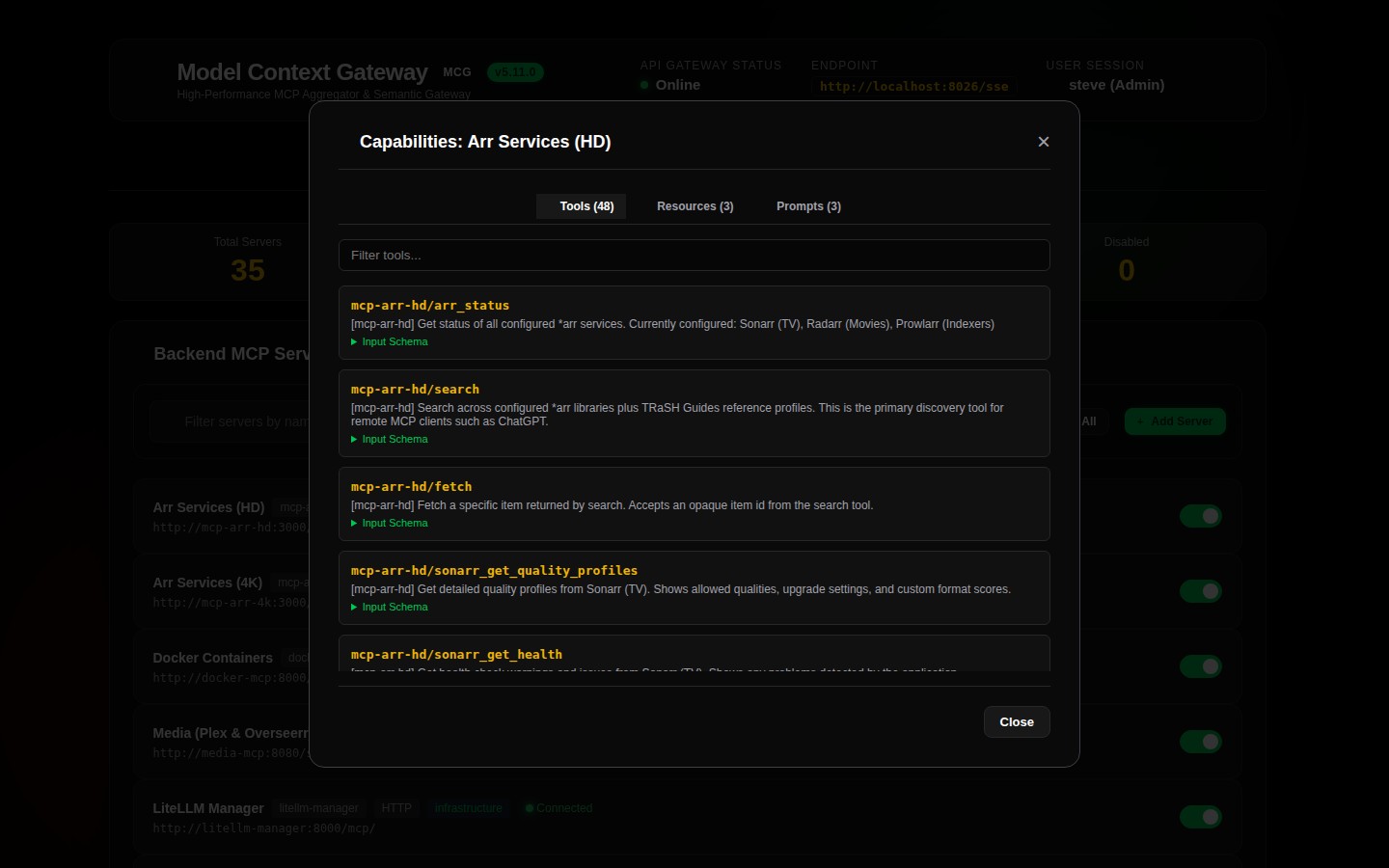
Click Inspect on any server card on the Overview dashboard to examine downstream capabilities:
- Tools Tab: Discovered tools, names, descriptions, and dynamic JSON Schema parameter requirements.
- Resources Tab: Virtual resource URIs (e.g.
mcp://docker/containers/list), MIME types, and descriptions. - Prompts Tab: Prompt templates and declared arguments.
- Raw Schema: Full JSON-RPC capabilities payload returned during protocol handshake.
🔗 Connected Accounts & Personal Egress OAuth (3LO)
When connecting downstream SaaS MCP servers (e.g. GitHub, Slack, Jira / Atlassian, Linear), organizations require users to execute actions as themselves rather than using a shared static service account.
The Personal Egress 3LO OAuth Engine ("Connected Accounts") enables seamless user authorization without distributing API keys or Personal Access Tokens (PATs) across developer laptops:
Operator Setup: Enabling 3LO on an MCP Server
- In the Dashboard or Admin MCP, select your backend server and open the configuration modal.
- Enable Enable OAuth (3LO).
- Configure the OAuth client credentials registered with your SaaS provider:
- Client ID (
oauthClientId): The OAuth Application Client ID. - Client Secret (
oauthClientSecret): The OAuth Application Secret (encrypted at rest). - Authorization URL (
oauthAuthorizationUrl): e.g.https://github.com/login/oauth/authorize. - Token URL (
oauthTokenUrl): e.g.https://github.com/login/oauth/access_token. - Requested Scopes (
oauthScopes): Comma/space-delimited scopes (e.g.repo,read:orgorread:jira-work,write:jira-work). - Redirect URI (
oauthRedirectUri): (Optional) Defaults to{gateway}/api/oauth/egress/callback.
- Client ID (
- Click Save Server.
Developer Experience: Connecting Personal Accounts
- Log into the MCG Dashboard and open the My MCP Servers view.
- For any server with OAuth enabled, a
Connect Accountbutton is displayed. - Click Connect Account. MCG initiates the third-party OAuth flow in your browser.
- After approval, the gateway vaults the access and refresh tokens. The status card updates to
Connected (OAuth). - When your AI assistant (Claude Code, Cursor, Windsurf) invokes tools on this server:
- The assistant authenticates to the gateway using its gateway AppKey or corporate JWT.
- The gateway strips the incoming gateway credential and dynamically injects
Authorization: Bearer <user_saas_token>. - When tokens near expiry, MCG uses the stored
refresh_tokento automatically renew credentials in the background with zero user intervention.
📄 Custom Tool JSON Specifications
For services that do not natively support the MCP protocol, you can register virtual tools and resources using custom JSON definitions:
- Navigate to Settings -> Prompts & Resources (or Custom Files).
- Click + Add Custom File.
- Select the file type (
Tools,Prompts, orResources), specify a filename, and enter valid JSON:
[
  {
    "name": "network_ping_host",
    "description": "Sends an ICMP ping to a target IP or hostname",
    "parameters": {
      "type": "object",
      "properties": {
        "host": {
          "type": "string",
          "description": "Target hostname or IPv4 address"
        },
        "count": {
          "type": "integer",
          "default": 4,
          "description": "Number of packets to send"
        }
      },
      "required": ["host"]
    }
  }
]- Click Save File. MCG immediately indexes the virtual definitions into the catalog and updates the semantic vector search engine.