Codebase Navigator & Omni-Search
The Codebase Navigator provides high-performance exploration of project directory structures, Tree-sitter AST declarations, API endpoints, caller/callee code relationships, full syntax-highlighted source code, and rendered Markdown documentation.
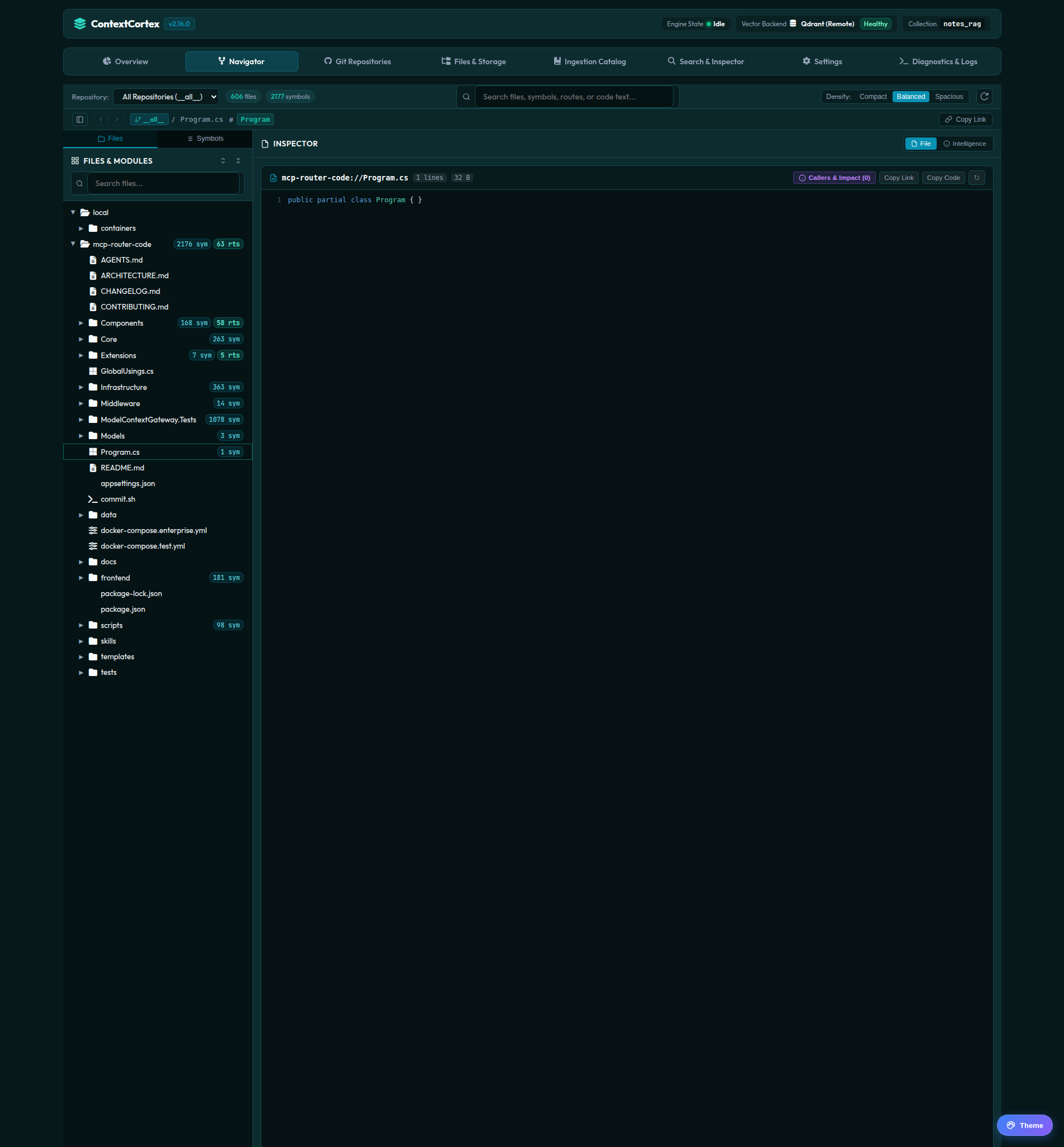
Hero Split View Architecture
The Codebase Navigator features a modern split layout optimized for code reading and deep architectural navigation:
1. Left Sidebar: Dual-Tab Tree & Outline
- Files Tab:
- Hierarchical directory and file tree with live search filtering and expand/collapse controls.
- Per-repository directory expansion persistence: expanded folder states are automatically saved and restored per repo across browser sessions (
sessionStorage). - AST symbol count badges and API route indicators next to files and directories.
- File-type icons (Python, TypeScript, JavaScript, C#, C++, Go, Rust, SQL, COBOL, JSON, Markdown, Dockerfile, etc.).
- Symbols Tab:
- Syntax-aware outline of all functions, classes, interfaces, and API routes extracted by Tree-sitter.
- Quick category filter chips: All Symbols, Functions, Classes & Structs, and API Routes.
- Parameter signatures, return types, line ranges, and HTTP method badges (
GET,POST, etc.).
2. Universal Omni-Search Command Palette (Ctrl+K / Cmd+K)
- Global Command Palette: Instant fuzzy search across repositories, file paths, AST symbols, and API endpoints from the toolbar or via
Ctrl+K/Cmd+K. - Match Types & Confidence Scoring:
[symbol]– High-confidence AST matches (e.g.99% AST exact match,94% AST prefix match).[file]– File path and module matches (92% filename match).[route]– REST endpoint paths (95% route match).
- Keyboard Navigation: Navigate results with ↑ and ↓, press Enter to jump, or Esc to dismiss.
- Zero-Shift Floating Overlay: Floats smoothly over the viewports without altering page heights.
3. Center Hero Viewport: Code Viewer, Doc Reader & Intelligence
- Full Source Code Viewer:
- Syntax highlighting powered by Prism across 8+ languages including C#, Python, JavaScript/TypeScript, C++, Go, Rust, SQL, and COBOL.
- Line numbers with target line range highlighting (
targetStartLine-targetEndLine) when jumping from Omni-Search or the symbols outline. - Copy clean file contents or permalinks directly to the clipboard.
- Collapsible bottom drawer for quick caller and callee inspection.
- Enhanced Markdown Document Reader:
- Safe GitHub Flavored Markdown (GFM) renderer for
.mdand.markdownfiles. - Automatic Table Normalization: Automatically bridges blank lines between table rows and synthesizes missing separator rows (
| --- | --- |) for non-standard Markdown tables. - Interactive Mermaid Diagrams: Embedded Mermaid diagrams (
flowchart,sequenceDiagram,classDiagram,erDiagram,stateDiagram) render directly inline. - Switch seamlessly between Rendered and Raw Source view modes.
- Safe GitHub Flavored Markdown (GFM) renderer for
- Instant Code Intelligence & Impact Inspector:
- Immediately available via the Intelligence tab on any opened file—no prior outline clicks required.
- Symbol kind, file path, line ranges, and 4-metric overview (Incoming Callers, Outgoing Callees, Total Imports, Language).
- Framework API route mapping card (
POST /v1/chat/completions). - Formatted signature block and docstring summary.
- Clickable caller and callee cards for cross-file jump navigation.
Layout Density & Mobile Responsiveness
- Density Options: Customize visual density using the header selector:
- Compact: Tight row spacing and minimal margins designed for high-density multi-file refactoring on laptops and widescreen monitors.
- Balanced (Default): Optimal spacing and font sizing for general architectural review.
- Spacious: Card-based presentation with generous padding and expanded docstring summaries.
- Responsive Stacking: On mobile and narrow viewports ($<900\text{px}$), the 3 panes seamlessly stack vertically with word-wrapping and container safeguards, guaranteeing zero horizontal overflow and zero element collisions.
Next Steps
- Test vector and keyword retrieval queries in Search & Inspector.
- Register and synchronize remote repositories in Git Repositories Management.